
STANDALONE FILE VAULT
PrivatyVault
Encrypt, organize, preview and make simple edits to your private files, without a video-editing suite.
Encrypted imports · Local previews · Auto classification · Auto-lock · Offline recovery key
See PrivatyVault PrivacyCut
TWO WINDOWS APPS. ONE PRIVATE WORKFLOW.
Keep private files in PrivatyVault. Edit photos and videos with PrivacyCut, with the complete vault built in. Your own files, on your own external drive.
Windows x64 · NTFS USB required · Final compatibility checks pending
01 / CHOOSE YOUR WORKSPACE
A standalone file vault, or a private editor with the same vault tools included. Compatible vaults can be used by either app.
STANDALONE FILE VAULT
Encrypt, organize, preview and make simple edits to your private files, without a video-editing suite.
Encrypted imports · Local previews · Auto classification · Auto-lock · Offline recovery key
See PrivatyVaultPRIVATE EDITOR + COMPLETE VAULT
Edit your photos and videos, and manage the same private file vault from inside PrivacyCut.
Local editing · Captions & audio · Privacy covers · Encrypted autosave · Two export choices
See PrivacyCutProduct plan: PrivatyVault is available as a separate product; PrivacyCut includes the complete vault capability without a second vault purchase. Both apps are preparing for release. Public purchase and license activation are not available yet.
02 / PRIVATYVAULT
Unlock a vault on your bound USB drive. Drop actual files from outside it into the middle All files list: encrypted copies enter this vault and are classified by format. Originals stay in place.
03 / PRIVACYCUT
Choose or unlock a vault, then create an edit from PrivacyCut standby. Import existing vault media or encrypt copies from outside it on the same bound drive.
PrivacyCutPrivate family diary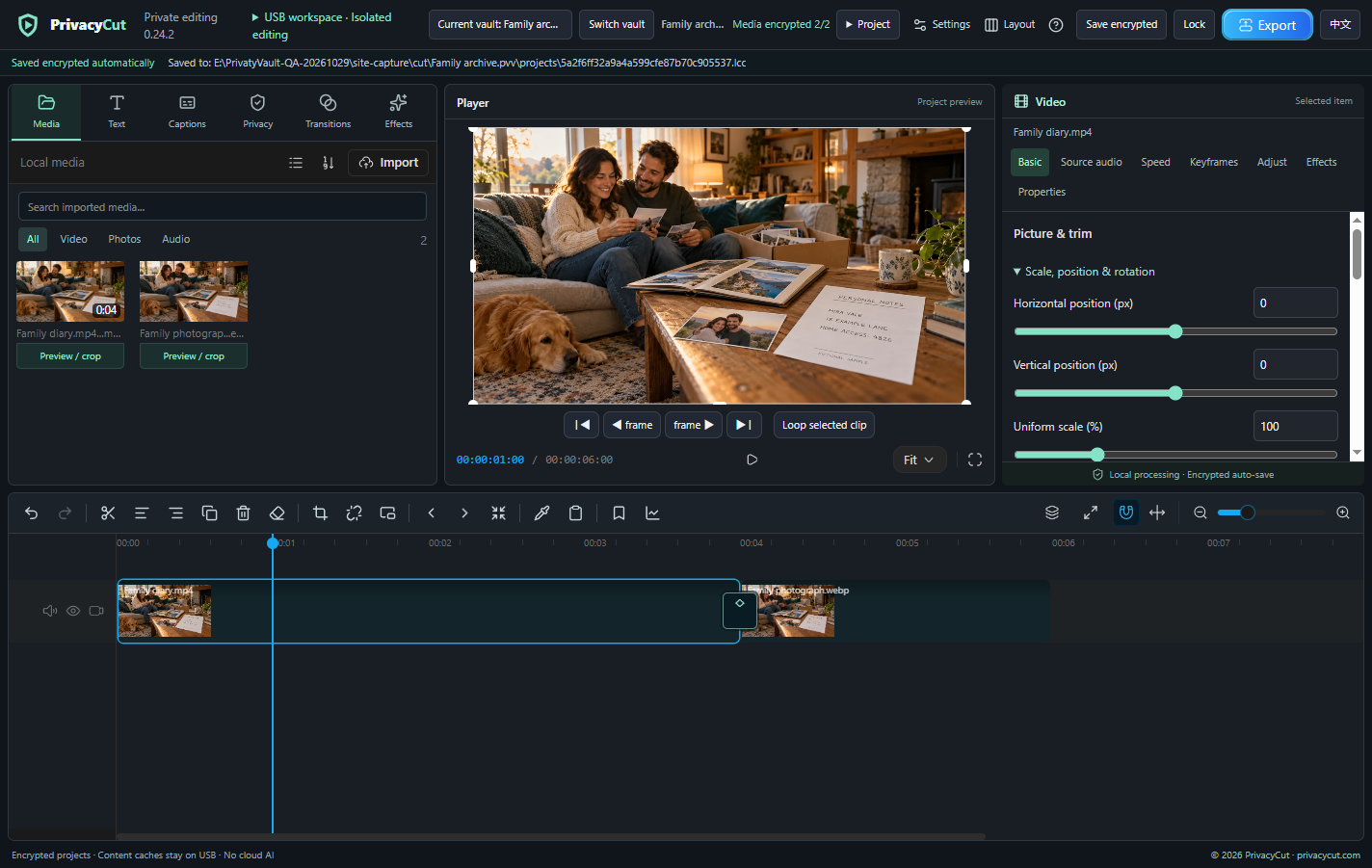
 family_01.mp400:12family_02.jpg
Bring your own files from the bound drive. The computer stays online while the app's media processing is isolated.
Workflow illustration using current PrivacyCut interface captures and fictional generated sample media, with animated overlays. Not a screen recording or an online editor. Your files are not processed by this website.
04 / A CLEAR PROTECTION BOUNDARY
Both apps bind to directly attached NTFS USB storage and isolate media processing. Vaults, projects and app-written content caches stay on that external storage; exports require a deliberate choice.
PrivatyVault + PrivacyCutIsolated local file processingThe protection target is to prevent these apps and their child processes from transmitting file contents or writing materials and content caches to the internal computer drive. The computer can stay online. Windows paging, hibernation, dumps and system-managed caches are outside the portable apps’ full control. A compromised host, screen recording by other apps, and other tools copying or syncing the external drive are outside this boundary.
These are development previews without completed code signing or an independent security audit. Originals and explicit plaintext exports remain outside vault encryption. Vault folder names can be visible; random names are optional. An offline recovery key can reset a forgotten password only while the complete vault is available. Encryption and recovery keys cannot recreate missing files. Session cleanup can be delayed after interruption or drive removal; this is not a secure-erasure promise.
BUILT FOR YOUR OWN SPACE
PrivatyVault for files. PrivacyCut for editing, with the vault included. Windows · English / 中文.
A FEW THINGS TO KNOW
No. Keep the computer online. The apps and their protected children process content with restricted networking and file paths, checked at startup. The target is to prevent transmission by these apps and internal-drive writes of materials, thumbnails, preview frames, segments and content caches. No cloud AI, cloud sync or stock-media service is connected. Website support is separate from the local Windows apps. The independent startup licence module sends only licensing metadata and a device digest. Content processes remain blocked from networking. DPAPI-protected local licensing metadata contains no media.
The protected workspace requires bound, directly attached NTFS USB storage. Network shares, mapped network drives, synced locations, FAT32 and exFAT are not protected workspaces. Check the drive letter and file system yourself; do not format a drive containing data just to try the app. Checks validate storage identity and path boundaries, not malware safety or device certification.
After choosing a vault and naming an edit, the project is automatically created and saved encrypted in that vault. Its path and status are visible; subsequent changes autosave without an initial Save As. Wait for saving before switching vaults, locking or exiting. Unfinished projects appear in Private edits. A project file alone is not a media backup; keep the external drive connected while working.
PrivacyCut defaults to encrypted finished output in the current vault. You may explicitly choose a normal plaintext file outside vaults on the bound USB, complete the privacy review and confirm its location. Plaintext cannot be saved to the internal drive or an unprotected location inside a vault. Outside plaintext outputs are not vault-encrypted. Current target: up to 1080p and 1 GB per editing export, subject to local codec support.
PrivatyVault is the standalone private file vault: encrypted storage, categories/subfolders, local preview and basic photo/video/audio/text, DOCX/XLSX and PDF work. PrivacyCut includes the same full vault plus multi-track photo/video editing, transitions, keyframes, captions, color and manual privacy tools. One named user does not need to buy Vault again with Cut. First release is planned through Microsoft Store MSIX; sales and public downloads remain closed pending release acceptance. Approved AUD prices are on /pricing/.
The latest local MSIX patch centers its system-native password dialog on the current app window. Choose an existing vault on the original selector, or enter its complete .pvv folder path on the bound USB, then unlock. Check the target path shown by the password dialog. Select the whole vault folder, not an individual .pvo object. Both products share the vault format; PrivacyCut can select a PrivatyVault vault. Close and lock the other app first: concurrent sessions cannot use the same vault or bound workspace.
Drop actual files from outside the vault on the bound USB into the middle All files list. There is no separate overlay covering the toolbar. Successful imports are categorized by format; originals remain. Internal-drive files, folders, virtual ZIP items and dragged web images are not accepted. If the cursor shows prohibited, check the actual file location and bound folder. Use Import as a fallback and report only the version and non-sensitive error text.
Record the offline recovery key when creating the vault. With the complete vault available, it can reset a forgotten password. There is no cloud recovery or support backdoor. A recovery key is not a file backup and cannot recreate deleted, missing or damaged content. Losing both password and key may make access impossible. Never send either to this help assistant or another person.
Add captions/text manually, import local subtitle files and set font/style. Fonts come from locally installed fonts, without an online font atlas. Import your own local music. This build has no cloud AI, automatic speech-to-caption service or stock-media library. You are responsible for rights to your fonts and music.